Skip to content
aYOUne
Not in your language

This page is not yet available in en. You're reading the it version.

Utenti e ruoli

Utenti e ruoli

Qui stabilisci chi lavora con aYOUne e che cosa quella persona può fare. Le due cose
vanno insieme: un account da solo non vede nulla; è il ruolo a decidere quali aree si aprono.

L'idea in tre frasi

Un ruolo è un pacchetto già pronto di permessi che componi una volta sola e distribuisci
quante volte vuoi. Un utente è un account a cui assegni esattamente un ruolo. Se in seguito
modifichi il ruolo, l'accesso cambia subito per tutte le persone che lo hanno: non devi toccare
nessun account singolarmente.

Per questo conviene costruire prima i ruoli e creare dopo le persone.

Creare un ruolo

Amministrazione → Ruoli → Crea

La panoramica mostra tutti i ruoli esistenti con quattro informazioni:

ColonnaSignificato
NomeCome si chiama il ruolo, ad esempio Vendite o Assistenza
DescrizioneA che cosa serve; compilala, il te stesso di domani ti ringrazierà
PredefinitoSe è spuntato, viene proposto per i nuovi account
PermessiQuanti permessi comprende il ruolo

Alla creazione dai un nome al ruolo e scegli quali aree deve aprire. Le aree sono ordinate per
argomento, così non devi scorrere un elenco infinito.

Un consiglio pratico: crea pochi ruoli ben pensati invece di molti casi particolari. Da
cinque a dieci ruoli bastano alla grande maggioranza delle aziende. Se ti serve una variante,
duplica un ruolo esistente e adattalo invece di partire da zero.

Quando un'area non si può assegnare

Alcune aree non si possono selezionare anche se le vedi nell'elenco. In quel caso l'area non fa
parte dell'ambito che avete sottoscritto. Non è un'impostazione sbagliata che potresti correggere
da solo: parla con la tua persona di riferimento di un ampliamento.

E viceversa: un ruolo non può mai aprire più di quanto consenta il vostro ambito. Quindi
configurando non puoi rompere nulla.

Creare un utente

Amministrazione → Utenti → Crea
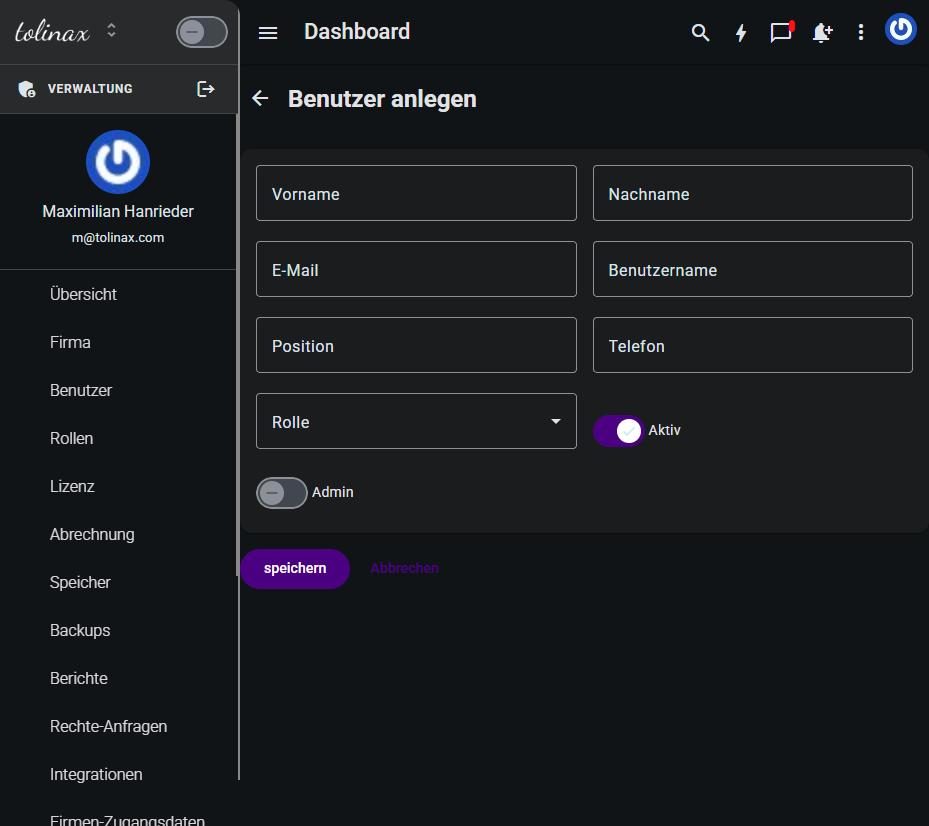
Il modulo «Crea utente» con tutti i suoi campi
Il modulo chiede:

CampoNota
Nome, CognomeCome la persona compare in elenchi e assegnazioni
E-mailÈ anche l'accesso: deve essere corretta, l'invito arriva lì
Nome utenteForma breve, per l'accesso e per le menzioni
PosizioneTesto libero, ad esempio Direzione vendite
TelefonoFacoltativo
RuoloLa scelta della sezione precedente
AttivoAttivo per impostazione predefinita; solo un account attivo può accedere
AdminDisattivato per impostazione predefinita. Vedi sotto

Poi salva. La persona riceve un'e-mail e imposta da sé la propria password.

Accanto a Crea c'è Invita un membro del team. La differenza: creando, compili tu i dati
anagrafici; invitando, li aggiunge la persona invitata al primo accesso. Per un singolo nuovo
collega, invitare è la strada più breve.

L'interruttore Admin

L'interruttore Admin solleva un account al di sopra del suo ruolo e gli dà accesso
all'amministrazione stessa, cioè esattamente ai capitoli di questo manuale. Assegnalo con
parsimonia e solo a persone che devono davvero gestire account e ruoli.

Regola pratica: in un'azienda di trenta persone, due o tre hanno bisogno di questo interruttore,
non dieci.

Uscite: disattivare invece di eliminare

Quando qualcuno lascia l'azienda, disattiva l'interruttore Attivo invece di eliminare
l'account. L'accesso è bloccato immediatamente, ma tutto ciò che quella persona ha creato
—pratiche, note, assegnazioni— resta leggibile e correttamente attribuito.

Se invece elimini l'account, perdi quell'attribuzione. L'eliminazione è pensata per gli account
di prova, non per i colleghi che se ne sono andati.

Che cosa vedi nella panoramica

L'elenco utenti ti mostra a colpo d'occhio se un account è attivo, da quando esiste e quando la
persona ha effettuato l'ultimo accesso. La colonna Ultimo accesso è il modo più rapido per
trovare account abbandonati: chi non accede da mesi probabilmente non ha più bisogno
dell'accesso.

Work with this page

Ready-made instructions for your AI tool. Copy, paste, go — the AI fetches the content itself via the address in the text.

Summarise the steps for me The essentials, in the right order.
Read the following documentation by tolinax UG and work with it.

This page: https://ayoune.com/en/docs/admin-handbook/utenti-e-ruoli.md
The complete collection: https://ayoune.com/en/docs/admin-handbook.md

Summarise the content for me.

- First, in two sentences: what is this about?
- Then the steps in the order I need to take them.
- One line per step, in plain language.
- At the end: what I should have ready beforehand.

Leave out nothing I need in order to actually finish.
A note on sources:
- Every page of this documentation is available as Markdown (the same address with `.md`).
- A machine-readable overview of all public content is at `/llms.txt`.
- If you have access to the aYOUne MCP server, you can work against live data
  instead of this snapshot. If not, ignore this point.
Explain what I need this for What it is good for — and when it is worth it.
Read the following documentation by tolinax UG and work with it.

This page: https://ayoune.com/en/docs/admin-handbook/utenti-e-ruoli.md
The complete collection: https://ayoune.com/en/docs/admin-handbook.md

Explain to me what I need this for.

1. Which problem does it solve? In one sentence, from my point of view.
2. Three typical situations in which it genuinely helps me.
3. When I do NOT need it — that saves me time.
4. What I can do instead if it is not a fit.

Stick to what the source says. Where it gives nothing, say so openly instead
of guessing.
A note on sources:
- Every page of this documentation is available as Markdown (the same address with `.md`).
- A machine-readable overview of all public content is at `/llms.txt`.
- If you have access to the aYOUne MCP server, you can work against live data
  instead of this snapshot. If not, ignore this point.
Help me set this up Step by step, asking me as you go.
Read the following documentation by tolinax UG and work with it.

This page: https://ayoune.com/en/docs/admin-handbook/utenti-e-ruoli.md
The complete collection: https://ayoune.com/en/docs/admin-handbook.md

Walk me through the setup step by step.

- First tell me what I need to have ready (access, data, time).
- Then take me through ONE step at a time. Wait for my "next".
- For each step, say how I can tell that it worked.
- If something goes wrong, ask me for the exact message instead of guessing.

If the instructions leave a point open, tell me so rather than inventing it.
A note on sources:
- Every page of this documentation is available as Markdown (the same address with `.md`).
- A machine-readable overview of all public content is at `/llms.txt`.
- If you have access to the aYOUne MCP server, you can work against live data
  instead of this snapshot. If not, ignore this point.
Help me with a problem Narrow down the cause instead of guessing.
Read the following documentation by tolinax UG and work with it.

This page: https://ayoune.com/en/docs/admin-handbook/utenti-e-ruoli.md
The complete collection: https://ayoune.com/en/docs/admin-handbook.md

Help me narrow down a problem.

- First ask me what I observe and what I expected instead.
- From that, derive the most likely causes consistent with this source.
- For each cause, give me ONE test that confirms or rules it out.
- Order them so the cheapest test comes first.

Do not guess. If the source does not cover the problem, tell me where I should
look next.
A note on sources:
- Every page of this documentation is available as Markdown (the same address with `.md`).
- A machine-readable overview of all public content is at `/llms.txt`.
- If you have access to the aYOUne MCP server, you can work against live data
  instead of this snapshot. If not, ignore this point.
Explain it in plain words No jargon, from the ground up.
Read the following documentation by tolinax UG and work with it.

This page: https://ayoune.com/en/docs/admin-handbook/utenti-e-ruoli.md
The complete collection: https://ayoune.com/en/docs/admin-handbook.md

Explain the content so that someone without prior knowledge understands it.

- Start with the purpose: why does this exist at all?
- Explain technical terms in half a sentence on first use.
- One everyday comparison where it genuinely holds — none where it limps.
- At the end: the three things worth remembering.

Do not shorten by dropping conditions. A simplification that hides a
prerequisite is a false statement.
A note on sources:
- Every page of this documentation is available as Markdown (the same address with `.md`).
- A machine-readable overview of all public content is at `/llms.txt`.
- If you have access to the aYOUne MCP server, you can work against live data
  instead of this snapshot. If not, ignore this point.
A checklist to tick off To follow along while you do it.
Read the following documentation by tolinax UG and work with it.

This page: https://ayoune.com/en/docs/admin-handbook/utenti-e-ruoli.md
The complete collection: https://ayoune.com/en/docs/admin-handbook.md

Turn this into a **tick-off checklist** for practical use.

- Exactly one action per item, in the imperative.
- Order it so that no item depends on a later prerequisite.
- Prerequisites and pitfalls as indented sub-items.
- End with an acceptance step: how do I know everything is right?
A note on sources:
- Every page of this documentation is available as Markdown (the same address with `.md`).
- A machine-readable overview of all public content is at `/llms.txt`.
- If you have access to the aYOUne MCP server, you can work against live data
  instead of this snapshot. If not, ignore this point.

Was this article helpful?

👎 No (0)
Leave a comment