aYOUne

Users and roles

This is where you decide who works with aYOUne and what that person may do. The two hang together: an account on its own sees nothing — only the role decides which areas open up.

The idea in three sentences

A role is a ready-made bundle of permissions that you put together once and hand out as often as you like. A user is an account to which you assign exactly one role. If you change the role later, access changes immediately for everyone who holds it — you never have to touch an individual account.

That is why it pays to build the roles first and create the people afterwards.

Creating a role

Administration → Roles → Create

The overview shows every existing role with four pieces of information:

Column Meaning
Name What the role is called, for example Sales or Service
Description What it is meant for — fill this in, your future self will thank you
Default If ticked, it is suggested for new accounts
Permissions How many permissions the role covers

When creating a role you give it a name and pick which areas it should open. The areas are grouped by topic, so you do not have to scroll through an endless list.

A practical piece of advice: create few well-considered roles rather than many special cases. Five to ten roles are enough for the vast majority of companies. If you need a variant, duplicate an existing role and adjust it instead of starting from scratch.

When an area cannot be granted

Some areas cannot be selected even though you can see them in the list. In that case the area is not part of the scope you have booked. This is not a misconfiguration you could fix yourself — talk to your contact about an extension.

The other way round: a role can never open more than your scope allows. So there is nothing you can break by configuring it.

Creating a user

Administration → Users → Create
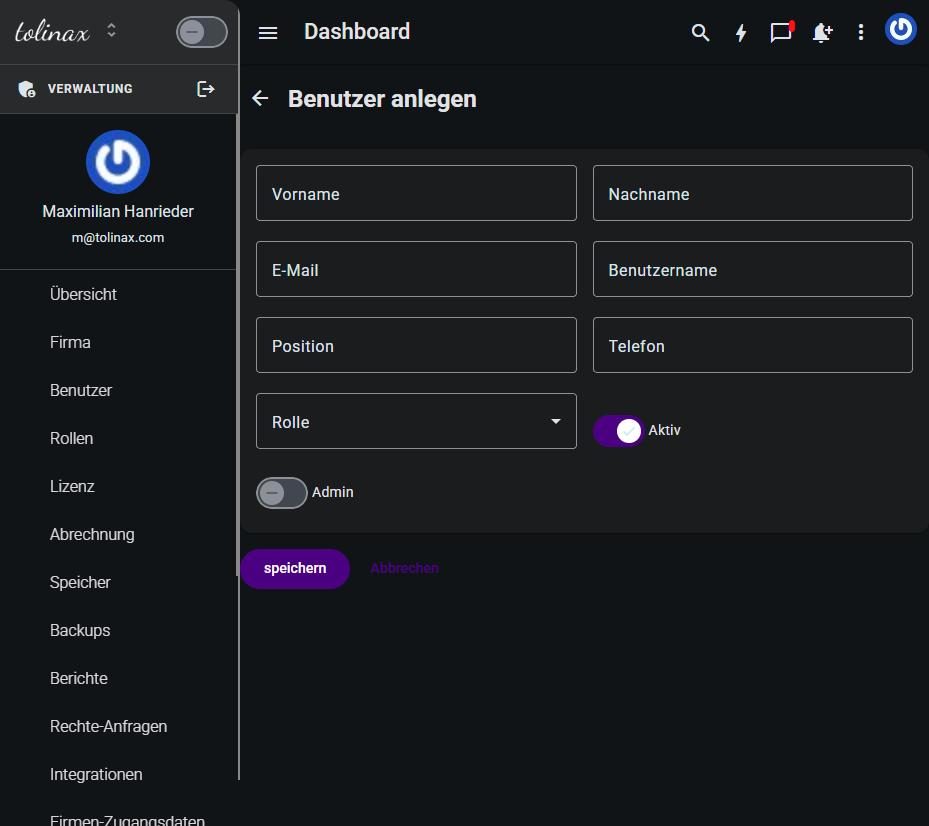
The "Create user" form with all of its fields The form asks for:

Field Note
First name, Last name How the person appears in lists and assignments
Email Also the sign-in — it has to be right, the invitation goes there
Username A short form, for signing in and for mentions
Position Free text, for example Head of Sales
Phone Optional
Role The choice from the previous section
Active On by default — only an active account can sign in
Admin Off by default. See below

Then save. The person receives an email and sets their own password.

Next to Create there is Invite team member. The difference: when creating, you fill in the master data yourself; when inviting, the invited person adds it on first sign-in. For a single new colleague, inviting is the shorter route.

The admin switch

The Admin switch lifts an account beyond its role and gives it access to the administration itself — that is, to exactly the chapters of this handbook. Hand it out sparingly and only to people who really are meant to maintain accounts and roles.

Rule of thumb: in a company of thirty people, two or three need this switch, not ten.

Leavers: deactivate rather than delete

When someone leaves the company, switch Active off instead of deleting the account. Signing in is blocked immediately, but everything that person created — records, notes, assignments — stays readable and correctly attributed.

Delete the account instead and you lose that attribution. Deleting is meant for test accounts, not for former colleagues.

What the overview shows you

The user list tells you at a glance whether an account is active, since when it has existed and when the person last signed in. The Last login column is the fastest way to find orphaned accounts: anyone who has not signed in for months probably no longer needs access.

Work with this page

Ready-made instructions for your AI tool. Copy, paste, go — the AI fetches the content itself via the address in the text.

Summarise the steps for me The essentials, in the right order.
Read the following documentation by tolinax UG and work with it.

This page: https://ayoune.com/en/docs/admin-handbook/users-and-roles.md
The complete collection: https://ayoune.com/en/docs/admin-handbook.md

Summarise the content for me.

- First, in two sentences: what is this about?
- Then the steps in the order I need to take them.
- One line per step, in plain language.
- At the end: what I should have ready beforehand.

Leave out nothing I need in order to actually finish.
A note on sources:
- Every page of this documentation is available as Markdown (the same address with `.md`).
- A machine-readable overview of all public content is at `/llms.txt`.
- If you have access to the aYOUne MCP server, you can work against live data
  instead of this snapshot. If not, ignore this point.
Explain what I need this for What it is good for — and when it is worth it.
Read the following documentation by tolinax UG and work with it.

This page: https://ayoune.com/en/docs/admin-handbook/users-and-roles.md
The complete collection: https://ayoune.com/en/docs/admin-handbook.md

Explain to me what I need this for.

1. Which problem does it solve? In one sentence, from my point of view.
2. Three typical situations in which it genuinely helps me.
3. When I do NOT need it — that saves me time.
4. What I can do instead if it is not a fit.

Stick to what the source says. Where it gives nothing, say so openly instead
of guessing.
A note on sources:
- Every page of this documentation is available as Markdown (the same address with `.md`).
- A machine-readable overview of all public content is at `/llms.txt`.
- If you have access to the aYOUne MCP server, you can work against live data
  instead of this snapshot. If not, ignore this point.
Help me set this up Step by step, asking me as you go.
Read the following documentation by tolinax UG and work with it.

This page: https://ayoune.com/en/docs/admin-handbook/users-and-roles.md
The complete collection: https://ayoune.com/en/docs/admin-handbook.md

Walk me through the setup step by step.

- First tell me what I need to have ready (access, data, time).
- Then take me through ONE step at a time. Wait for my "next".
- For each step, say how I can tell that it worked.
- If something goes wrong, ask me for the exact message instead of guessing.

If the instructions leave a point open, tell me so rather than inventing it.
A note on sources:
- Every page of this documentation is available as Markdown (the same address with `.md`).
- A machine-readable overview of all public content is at `/llms.txt`.
- If you have access to the aYOUne MCP server, you can work against live data
  instead of this snapshot. If not, ignore this point.
Help me with a problem Narrow down the cause instead of guessing.
Read the following documentation by tolinax UG and work with it.

This page: https://ayoune.com/en/docs/admin-handbook/users-and-roles.md
The complete collection: https://ayoune.com/en/docs/admin-handbook.md

Help me narrow down a problem.

- First ask me what I observe and what I expected instead.
- From that, derive the most likely causes consistent with this source.
- For each cause, give me ONE test that confirms or rules it out.
- Order them so the cheapest test comes first.

Do not guess. If the source does not cover the problem, tell me where I should
look next.
A note on sources:
- Every page of this documentation is available as Markdown (the same address with `.md`).
- A machine-readable overview of all public content is at `/llms.txt`.
- If you have access to the aYOUne MCP server, you can work against live data
  instead of this snapshot. If not, ignore this point.
Explain it in plain words No jargon, from the ground up.
Read the following documentation by tolinax UG and work with it.

This page: https://ayoune.com/en/docs/admin-handbook/users-and-roles.md
The complete collection: https://ayoune.com/en/docs/admin-handbook.md

Explain the content so that someone without prior knowledge understands it.

- Start with the purpose: why does this exist at all?
- Explain technical terms in half a sentence on first use.
- One everyday comparison where it genuinely holds — none where it limps.
- At the end: the three things worth remembering.

Do not shorten by dropping conditions. A simplification that hides a
prerequisite is a false statement.
A note on sources:
- Every page of this documentation is available as Markdown (the same address with `.md`).
- A machine-readable overview of all public content is at `/llms.txt`.
- If you have access to the aYOUne MCP server, you can work against live data
  instead of this snapshot. If not, ignore this point.
A checklist to tick off To follow along while you do it.
Read the following documentation by tolinax UG and work with it.

This page: https://ayoune.com/en/docs/admin-handbook/users-and-roles.md
The complete collection: https://ayoune.com/en/docs/admin-handbook.md

Turn this into a **tick-off checklist** for practical use.

- Exactly one action per item, in the imperative.
- Order it so that no item depends on a later prerequisite.
- Prerequisites and pitfalls as indented sub-items.
- End with an acceptance step: how do I know everything is right?
A note on sources:
- Every page of this documentation is available as Markdown (the same address with `.md`).
- A machine-readable overview of all public content is at `/llms.txt`.
- If you have access to the aYOUne MCP server, you can work against live data
  instead of this snapshot. If not, ignore this point.

Was this article helpful?

👎 No (0)
Leave a comment