Skip to content
aYOUne
Not in your language

This page is not yet available in en. You're reading the it version.

Primi passi

Primi passi

Questo capitolo ti accompagna una volta dall'accesso fino all'amministrazione. Dopo saprai dove
si trova tutto ciò che viene descritto negli altri capitoli.

Accedere

Accedi con il tuo indirizzo e-mail aziendale e la tua password. Se qualcuno ha appena creato il
tuo account, ricevi un'e-mail con un link per impostare tu stesso la password: una password
iniziale non viene mai inviata.

Se non riesci a entrare, controlla prima se il tuo account è ancora attivo. Un account
disattivato non può accedere; è questione di secondi cambiarlo nella gestione utenti.

Aprire l'amministrazione

Apri il menu in alto a sinistra e passa all'area Amministrazione. La pagina iniziale di
quest'area è una panoramica di riquadri; alla sua sinistra la stessa scelta compare di nuovo
come elenco. Entrambe portano allo stesso posto: usa quella che preferisci.
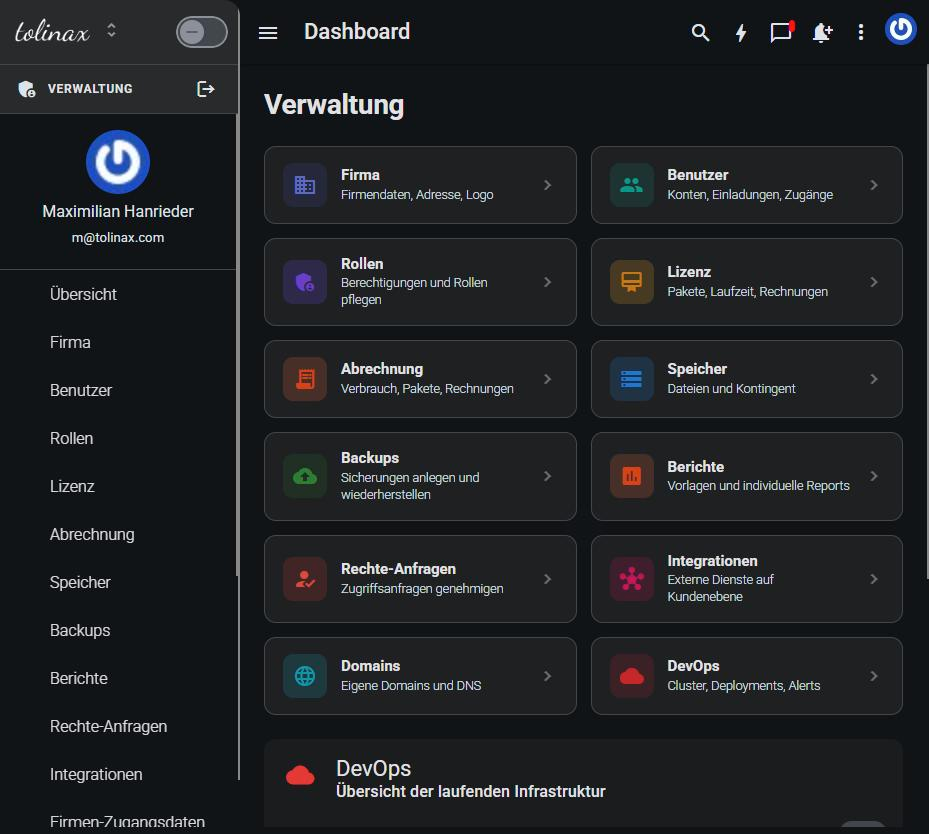
La panoramica dell'area Amministrazione con i suoi riquadri

Che cosa ci trovi

RiquadroA che cosa ti serve
AziendaDati aziendali, indirizzo, settore, e sotto Marchio logo e marchio
UtentiCreare, modificare, attivare e disattivare account
RuoliStabilire chi può vedere e modificare quali aree
LicenzaPacchetti sottoscritti e durata
FatturazioneConsumi e fatture
ArchiviazioneSpazio occupato e quota
BackupCreare e ripristinare backup
ReportModelli e analisi personalizzate
Richieste di permessiApprovare le richieste di accesso del tuo team
IntegrazioniCollegamenti a servizi esterni
DominiRegistrare indirizzi web propri

Da dove iniziare

Per un'azienda appena configurata questo è l'ordine più tranquillo:

  1. Compilare Azienda: nome, indirizzo e settore. Il settore determina quali moduli ti

vengono proposti nella pagina iniziale.

  1. Impostare il Marchio, così le tue persone vedono il vostro marchio fin dal primo giorno.
  2. Creare i Ruoli prima di invitare qualcuno, altrimenti dovrai poi correggere ogni account

uno per uno.

  1. Creare gli Utenti e assegnare a ciascuno il ruolo adatto.

Il passo 3 prima del passo 4 è il vero consiglio di questo capitolo. Tutto il resto si può
recuperare in qualsiasi momento.

Una nota sulle voci di menu mancanti

Vedi solo ciò per cui sei autorizzato. Se ti manca un riquadro, ti manca il permesso. Non è un
errore, è la gestione dei permessi che fa il suo lavoro.

Work with this page

Ready-made instructions for your AI tool. Copy, paste, go — the AI fetches the content itself via the address in the text.

Summarise the steps for me The essentials, in the right order.
Read the following documentation by tolinax UG and work with it.

This page: https://ayoune.com/en/docs/admin-handbook/primi-passi.md
The complete collection: https://ayoune.com/en/docs/admin-handbook.md

Summarise the content for me.

- First, in two sentences: what is this about?
- Then the steps in the order I need to take them.
- One line per step, in plain language.
- At the end: what I should have ready beforehand.

Leave out nothing I need in order to actually finish.
A note on sources:
- Every page of this documentation is available as Markdown (the same address with `.md`).
- A machine-readable overview of all public content is at `/llms.txt`.
- If you have access to the aYOUne MCP server, you can work against live data
  instead of this snapshot. If not, ignore this point.
Explain what I need this for What it is good for — and when it is worth it.
Read the following documentation by tolinax UG and work with it.

This page: https://ayoune.com/en/docs/admin-handbook/primi-passi.md
The complete collection: https://ayoune.com/en/docs/admin-handbook.md

Explain to me what I need this for.

1. Which problem does it solve? In one sentence, from my point of view.
2. Three typical situations in which it genuinely helps me.
3. When I do NOT need it — that saves me time.
4. What I can do instead if it is not a fit.

Stick to what the source says. Where it gives nothing, say so openly instead
of guessing.
A note on sources:
- Every page of this documentation is available as Markdown (the same address with `.md`).
- A machine-readable overview of all public content is at `/llms.txt`.
- If you have access to the aYOUne MCP server, you can work against live data
  instead of this snapshot. If not, ignore this point.
Help me set this up Step by step, asking me as you go.
Read the following documentation by tolinax UG and work with it.

This page: https://ayoune.com/en/docs/admin-handbook/primi-passi.md
The complete collection: https://ayoune.com/en/docs/admin-handbook.md

Walk me through the setup step by step.

- First tell me what I need to have ready (access, data, time).
- Then take me through ONE step at a time. Wait for my "next".
- For each step, say how I can tell that it worked.
- If something goes wrong, ask me for the exact message instead of guessing.

If the instructions leave a point open, tell me so rather than inventing it.
A note on sources:
- Every page of this documentation is available as Markdown (the same address with `.md`).
- A machine-readable overview of all public content is at `/llms.txt`.
- If you have access to the aYOUne MCP server, you can work against live data
  instead of this snapshot. If not, ignore this point.
Help me with a problem Narrow down the cause instead of guessing.
Read the following documentation by tolinax UG and work with it.

This page: https://ayoune.com/en/docs/admin-handbook/primi-passi.md
The complete collection: https://ayoune.com/en/docs/admin-handbook.md

Help me narrow down a problem.

- First ask me what I observe and what I expected instead.
- From that, derive the most likely causes consistent with this source.
- For each cause, give me ONE test that confirms or rules it out.
- Order them so the cheapest test comes first.

Do not guess. If the source does not cover the problem, tell me where I should
look next.
A note on sources:
- Every page of this documentation is available as Markdown (the same address with `.md`).
- A machine-readable overview of all public content is at `/llms.txt`.
- If you have access to the aYOUne MCP server, you can work against live data
  instead of this snapshot. If not, ignore this point.
Explain it in plain words No jargon, from the ground up.
Read the following documentation by tolinax UG and work with it.

This page: https://ayoune.com/en/docs/admin-handbook/primi-passi.md
The complete collection: https://ayoune.com/en/docs/admin-handbook.md

Explain the content so that someone without prior knowledge understands it.

- Start with the purpose: why does this exist at all?
- Explain technical terms in half a sentence on first use.
- One everyday comparison where it genuinely holds — none where it limps.
- At the end: the three things worth remembering.

Do not shorten by dropping conditions. A simplification that hides a
prerequisite is a false statement.
A note on sources:
- Every page of this documentation is available as Markdown (the same address with `.md`).
- A machine-readable overview of all public content is at `/llms.txt`.
- If you have access to the aYOUne MCP server, you can work against live data
  instead of this snapshot. If not, ignore this point.
A checklist to tick off To follow along while you do it.
Read the following documentation by tolinax UG and work with it.

This page: https://ayoune.com/en/docs/admin-handbook/primi-passi.md
The complete collection: https://ayoune.com/en/docs/admin-handbook.md

Turn this into a **tick-off checklist** for practical use.

- Exactly one action per item, in the imperative.
- Order it so that no item depends on a later prerequisite.
- Prerequisites and pitfalls as indented sub-items.
- End with an acceptance step: how do I know everything is right?
A note on sources:
- Every page of this documentation is available as Markdown (the same address with `.md`).
- A machine-readable overview of all public content is at `/llms.txt`.
- If you have access to the aYOUne MCP server, you can work against live data
  instead of this snapshot. If not, ignore this point.

Was this article helpful?

👎 No (0)
Leave a comment