Skip to content
aYOUne
Not in your language

This page is not yet available in en. You're reading the es version.

Usuarios y roles

Usuarios y roles

Aquí decides quién trabaja con aYOUne y qué puede hacer esa persona. Ambas cosas van
juntas: una cuenta por sí sola no ve nada; solo el rol decide qué áreas se abren.

La idea en tres frases

Un rol es un paquete cerrado de permisos que compones una vez y repartes tantas veces como
quieras. Un usuario es una cuenta a la que asignas exactamente un rol. Si más adelante
cambias el rol, el acceso cambia de inmediato para todas las personas que lo tienen: no hace
falta tocar ninguna cuenta por separado.

Por eso conviene construir primero los roles y crear después a las personas.

Crear un rol

Administración → Roles → Crear

La vista general muestra todos los roles existentes con cuatro datos:

ColumnaSignificado
NombreCómo se llama el rol, por ejemplo Ventas o Servicio
DescripciónPara qué está pensado; rellénalo, tu yo futuro te lo agradecerá
PredeterminadoSi está marcado, se propone para las cuentas nuevas
PermisosCuántos permisos abarca el rol

Al crearlo le das un nombre al rol y eliges qué áreas debe abrir. Las áreas están ordenadas por
temas, así que no tienes que recorrer una lista interminable.

Un consejo práctico: crea pocos roles bien pensados en lugar de muchos casos especiales.
De cinco a diez roles bastan para la gran mayoría de las empresas. Si necesitas una variante,
duplica un rol existente y ajústalo en vez de empezar de cero.

Cuando un área no se puede conceder

Algunas áreas no se pueden seleccionar aunque las veas en la lista. En ese caso el área no forma
parte del alcance que habéis contratado. No es una configuración errónea que puedas corregir tú
mismo: habla con tu persona de contacto sobre una ampliación.

Y al revés: un rol nunca puede abrir más de lo que permite vuestro alcance. Así que no puedes
estropear nada configurando.

Crear un usuario

Administración → Usuarios → Crear
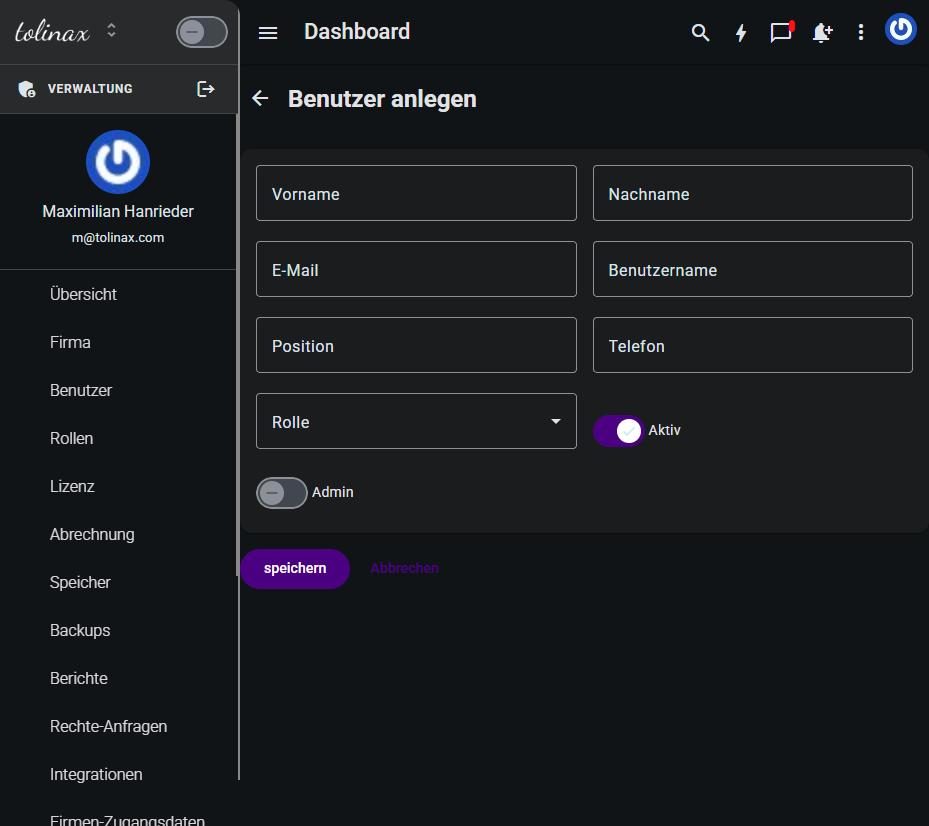
El formulario «Crear usuario» con todos sus campos
El formulario pregunta:

CampoObservación
Nombre, ApellidosCómo aparece la persona en listas y asignaciones
Correo electrónicoEs a la vez el inicio de sesión; tiene que ser correcto, ahí llega la invitación
Nombre de usuarioForma corta, para iniciar sesión y para las menciones
PuestoTexto libre, por ejemplo Dirección de ventas
TeléfonoOpcional
RolLa selección del apartado anterior
ActivoActivado por defecto; solo una cuenta activa puede iniciar sesión
AdminDesactivado por defecto. Véase más abajo

Después, guardar. La persona recibe un correo y establece ella misma su contraseña.

Junto a Crear está Invitar a un miembro del equipo. La diferencia: al crear, rellenas tú
los datos maestros; al invitar, los completa la persona invitada en su primer inicio de sesión.
Para un solo compañero nuevo, invitar es el camino más corto.

El interruptor Admin

El interruptor Admin eleva una cuenta por encima de su rol y le da acceso a la propia
administración, es decir, exactamente a los capítulos de este manual. Concédelo con moderación y
solo a personas que realmente deban mantener cuentas y roles.

Regla general: en una empresa de treinta personas, dos o tres necesitan este interruptor, no
diez.

Bajas: desactivar en lugar de borrar

Cuando alguien deja la empresa, desactiva el interruptor Activo en lugar de borrar la
cuenta. El inicio de sesión queda bloqueado de inmediato, pero todo lo que esa persona creó
—expedientes, notas, asignaciones— sigue siendo legible y correctamente atribuido.

Si borras la cuenta, pierdes esa atribución. Borrar está pensado para cuentas de prueba, no para
compañeros que se han ido.

Qué ves en la vista general

La lista de usuarios te muestra de un vistazo si una cuenta está activa, desde cuándo existe y
cuándo inició sesión la persona por última vez. La columna Último acceso es la vía más
rápida para encontrar cuentas huérfanas: quien lleva meses sin iniciar sesión probablemente ya
no necesita el acceso.

Work with this page

Ready-made instructions for your AI tool. Copy, paste, go — the AI fetches the content itself via the address in the text.

Summarise the steps for me The essentials, in the right order.
Read the following documentation by tolinax UG and work with it.

This page: https://ayoune.com/en/docs/admin-handbook/usuarios-y-roles.md
The complete collection: https://ayoune.com/en/docs/admin-handbook.md

Summarise the content for me.

- First, in two sentences: what is this about?
- Then the steps in the order I need to take them.
- One line per step, in plain language.
- At the end: what I should have ready beforehand.

Leave out nothing I need in order to actually finish.
A note on sources:
- Every page of this documentation is available as Markdown (the same address with `.md`).
- A machine-readable overview of all public content is at `/llms.txt`.
- If you have access to the aYOUne MCP server, you can work against live data
  instead of this snapshot. If not, ignore this point.
Explain what I need this for What it is good for — and when it is worth it.
Read the following documentation by tolinax UG and work with it.

This page: https://ayoune.com/en/docs/admin-handbook/usuarios-y-roles.md
The complete collection: https://ayoune.com/en/docs/admin-handbook.md

Explain to me what I need this for.

1. Which problem does it solve? In one sentence, from my point of view.
2. Three typical situations in which it genuinely helps me.
3. When I do NOT need it — that saves me time.
4. What I can do instead if it is not a fit.

Stick to what the source says. Where it gives nothing, say so openly instead
of guessing.
A note on sources:
- Every page of this documentation is available as Markdown (the same address with `.md`).
- A machine-readable overview of all public content is at `/llms.txt`.
- If you have access to the aYOUne MCP server, you can work against live data
  instead of this snapshot. If not, ignore this point.
Help me set this up Step by step, asking me as you go.
Read the following documentation by tolinax UG and work with it.

This page: https://ayoune.com/en/docs/admin-handbook/usuarios-y-roles.md
The complete collection: https://ayoune.com/en/docs/admin-handbook.md

Walk me through the setup step by step.

- First tell me what I need to have ready (access, data, time).
- Then take me through ONE step at a time. Wait for my "next".
- For each step, say how I can tell that it worked.
- If something goes wrong, ask me for the exact message instead of guessing.

If the instructions leave a point open, tell me so rather than inventing it.
A note on sources:
- Every page of this documentation is available as Markdown (the same address with `.md`).
- A machine-readable overview of all public content is at `/llms.txt`.
- If you have access to the aYOUne MCP server, you can work against live data
  instead of this snapshot. If not, ignore this point.
Help me with a problem Narrow down the cause instead of guessing.
Read the following documentation by tolinax UG and work with it.

This page: https://ayoune.com/en/docs/admin-handbook/usuarios-y-roles.md
The complete collection: https://ayoune.com/en/docs/admin-handbook.md

Help me narrow down a problem.

- First ask me what I observe and what I expected instead.
- From that, derive the most likely causes consistent with this source.
- For each cause, give me ONE test that confirms or rules it out.
- Order them so the cheapest test comes first.

Do not guess. If the source does not cover the problem, tell me where I should
look next.
A note on sources:
- Every page of this documentation is available as Markdown (the same address with `.md`).
- A machine-readable overview of all public content is at `/llms.txt`.
- If you have access to the aYOUne MCP server, you can work against live data
  instead of this snapshot. If not, ignore this point.
Explain it in plain words No jargon, from the ground up.
Read the following documentation by tolinax UG and work with it.

This page: https://ayoune.com/en/docs/admin-handbook/usuarios-y-roles.md
The complete collection: https://ayoune.com/en/docs/admin-handbook.md

Explain the content so that someone without prior knowledge understands it.

- Start with the purpose: why does this exist at all?
- Explain technical terms in half a sentence on first use.
- One everyday comparison where it genuinely holds — none where it limps.
- At the end: the three things worth remembering.

Do not shorten by dropping conditions. A simplification that hides a
prerequisite is a false statement.
A note on sources:
- Every page of this documentation is available as Markdown (the same address with `.md`).
- A machine-readable overview of all public content is at `/llms.txt`.
- If you have access to the aYOUne MCP server, you can work against live data
  instead of this snapshot. If not, ignore this point.
A checklist to tick off To follow along while you do it.
Read the following documentation by tolinax UG and work with it.

This page: https://ayoune.com/en/docs/admin-handbook/usuarios-y-roles.md
The complete collection: https://ayoune.com/en/docs/admin-handbook.md

Turn this into a **tick-off checklist** for practical use.

- Exactly one action per item, in the imperative.
- Order it so that no item depends on a later prerequisite.
- Prerequisites and pitfalls as indented sub-items.
- End with an acceptance step: how do I know everything is right?
A note on sources:
- Every page of this documentation is available as Markdown (the same address with `.md`).
- A machine-readable overview of all public content is at `/llms.txt`.
- If you have access to the aYOUne MCP server, you can work against live data
  instead of this snapshot. If not, ignore this point.

Was this article helpful?

👎 No (0)
Leave a comment