Skip to content
aYOUne
Not in your language

This page is not yet available in en. You're reading the es version.

Primeros pasos

Primeros pasos

Este capítulo te lleva una vez desde el inicio de sesión hasta la administración. Después sabrás
dónde está todo lo que se describe en los demás capítulos.

Iniciar sesión

Inicia sesión con tu dirección de correo profesional y tu contraseña. Si alguien acaba de crear
tu cuenta, recibirás un correo con un enlace para establecer tú mismo la contraseña; nunca se
envía una contraseña inicial.

Si no consigues entrar, comprueba primero si tu cuenta sigue activa. Una cuenta desactivada no
puede iniciar sesión, y eso se cambia en segundos desde la gestión de usuarios.

Abrir la administración

Abre el menú arriba a la izquierda y cambia al área Administración. La página de inicio de
esa área es una vista general de mosaicos; a su izquierda aparece la misma selección otra vez en
forma de lista. Ambas llevan al mismo sitio: usa la que prefieras.
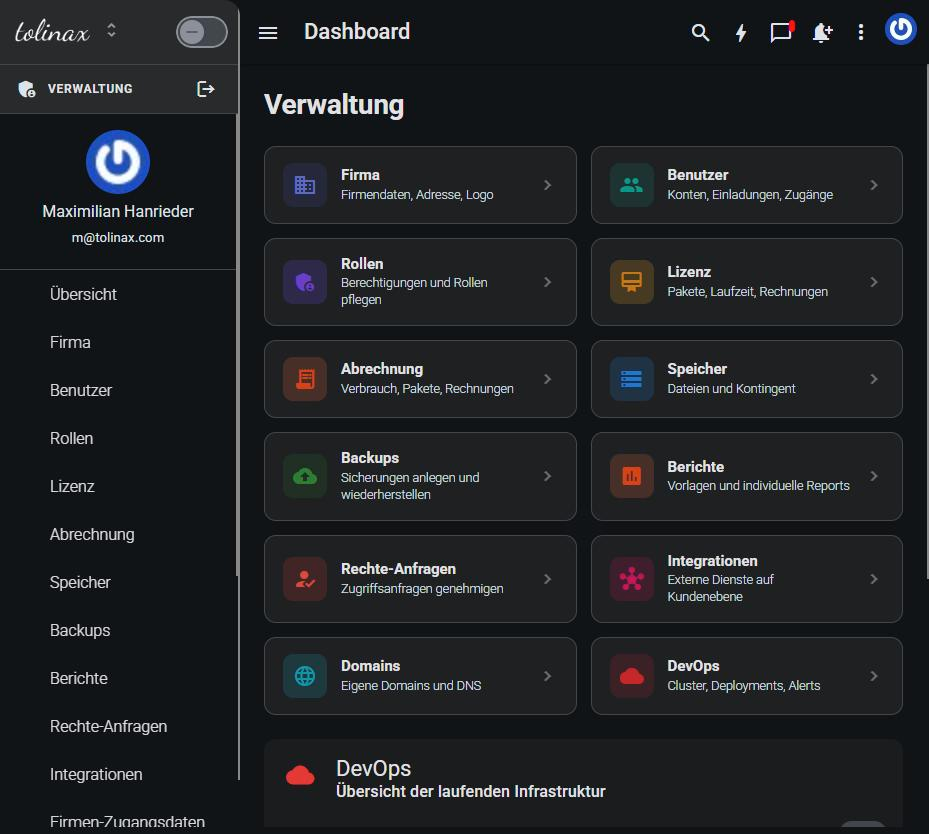
La vista general del área Administración con sus mosaicos

Qué encontrarás allí

MosaicoPara qué lo necesitas
EmpresaDatos de la empresa, dirección, sector, y en Marca el logotipo y la marca
UsuariosCrear, editar, activar y desactivar cuentas
RolesDefinir quién puede ver y editar qué áreas
LicenciaPaquetes contratados y vigencia
FacturaciónConsumo y facturas
AlmacenamientoEspacio ocupado y cuota
Copias de seguridadCrear y restaurar copias
InformesPlantillas y análisis propios
Solicitudes de permisosAprobar peticiones de acceso de tu equipo
IntegracionesConexiones con servicios externos
DominiosRegistrar direcciones web propias

Por dónde empezar

Para una empresa recién configurada, este es el orden más tranquilo:

  1. Rellenar Empresa: nombre, dirección y sector. El sector determina qué módulos se te

proponen en la página de inicio.

  1. Definir la Marca, para que tu gente vea vuestra marca desde el primer día.
  2. Crear los Roles antes de invitar a nadie; de lo contrario tendrás que retocar después cada

cuenta una por una.

  1. Crear los Usuarios y darles el rol adecuado.

El paso 3 antes del paso 4 es el verdadero consejo de este capítulo. Todo lo demás puede hacerse
en cualquier momento.

Una nota sobre entradas de menú que faltan

Solo ves aquello para lo que tienes permiso. Si te falta un mosaico, lo que falta es el permiso.
No es un fallo, sino la gestión de permisos haciendo su trabajo.

Work with this page

Ready-made instructions for your AI tool. Copy, paste, go — the AI fetches the content itself via the address in the text.

Summarise the steps for me The essentials, in the right order.
Read the following documentation by tolinax UG and work with it.

This page: https://ayoune.com/en/docs/admin-handbook/primeros-pasos.md
The complete collection: https://ayoune.com/en/docs/admin-handbook.md

Summarise the content for me.

- First, in two sentences: what is this about?
- Then the steps in the order I need to take them.
- One line per step, in plain language.
- At the end: what I should have ready beforehand.

Leave out nothing I need in order to actually finish.
A note on sources:
- Every page of this documentation is available as Markdown (the same address with `.md`).
- A machine-readable overview of all public content is at `/llms.txt`.
- If you have access to the aYOUne MCP server, you can work against live data
  instead of this snapshot. If not, ignore this point.
Explain what I need this for What it is good for — and when it is worth it.
Read the following documentation by tolinax UG and work with it.

This page: https://ayoune.com/en/docs/admin-handbook/primeros-pasos.md
The complete collection: https://ayoune.com/en/docs/admin-handbook.md

Explain to me what I need this for.

1. Which problem does it solve? In one sentence, from my point of view.
2. Three typical situations in which it genuinely helps me.
3. When I do NOT need it — that saves me time.
4. What I can do instead if it is not a fit.

Stick to what the source says. Where it gives nothing, say so openly instead
of guessing.
A note on sources:
- Every page of this documentation is available as Markdown (the same address with `.md`).
- A machine-readable overview of all public content is at `/llms.txt`.
- If you have access to the aYOUne MCP server, you can work against live data
  instead of this snapshot. If not, ignore this point.
Help me set this up Step by step, asking me as you go.
Read the following documentation by tolinax UG and work with it.

This page: https://ayoune.com/en/docs/admin-handbook/primeros-pasos.md
The complete collection: https://ayoune.com/en/docs/admin-handbook.md

Walk me through the setup step by step.

- First tell me what I need to have ready (access, data, time).
- Then take me through ONE step at a time. Wait for my "next".
- For each step, say how I can tell that it worked.
- If something goes wrong, ask me for the exact message instead of guessing.

If the instructions leave a point open, tell me so rather than inventing it.
A note on sources:
- Every page of this documentation is available as Markdown (the same address with `.md`).
- A machine-readable overview of all public content is at `/llms.txt`.
- If you have access to the aYOUne MCP server, you can work against live data
  instead of this snapshot. If not, ignore this point.
Help me with a problem Narrow down the cause instead of guessing.
Read the following documentation by tolinax UG and work with it.

This page: https://ayoune.com/en/docs/admin-handbook/primeros-pasos.md
The complete collection: https://ayoune.com/en/docs/admin-handbook.md

Help me narrow down a problem.

- First ask me what I observe and what I expected instead.
- From that, derive the most likely causes consistent with this source.
- For each cause, give me ONE test that confirms or rules it out.
- Order them so the cheapest test comes first.

Do not guess. If the source does not cover the problem, tell me where I should
look next.
A note on sources:
- Every page of this documentation is available as Markdown (the same address with `.md`).
- A machine-readable overview of all public content is at `/llms.txt`.
- If you have access to the aYOUne MCP server, you can work against live data
  instead of this snapshot. If not, ignore this point.
Explain it in plain words No jargon, from the ground up.
Read the following documentation by tolinax UG and work with it.

This page: https://ayoune.com/en/docs/admin-handbook/primeros-pasos.md
The complete collection: https://ayoune.com/en/docs/admin-handbook.md

Explain the content so that someone without prior knowledge understands it.

- Start with the purpose: why does this exist at all?
- Explain technical terms in half a sentence on first use.
- One everyday comparison where it genuinely holds — none where it limps.
- At the end: the three things worth remembering.

Do not shorten by dropping conditions. A simplification that hides a
prerequisite is a false statement.
A note on sources:
- Every page of this documentation is available as Markdown (the same address with `.md`).
- A machine-readable overview of all public content is at `/llms.txt`.
- If you have access to the aYOUne MCP server, you can work against live data
  instead of this snapshot. If not, ignore this point.
A checklist to tick off To follow along while you do it.
Read the following documentation by tolinax UG and work with it.

This page: https://ayoune.com/en/docs/admin-handbook/primeros-pasos.md
The complete collection: https://ayoune.com/en/docs/admin-handbook.md

Turn this into a **tick-off checklist** for practical use.

- Exactly one action per item, in the imperative.
- Order it so that no item depends on a later prerequisite.
- Prerequisites and pitfalls as indented sub-items.
- End with an acceptance step: how do I know everything is right?
A note on sources:
- Every page of this documentation is available as Markdown (the same address with `.md`).
- A machine-readable overview of all public content is at `/llms.txt`.
- If you have access to the aYOUne MCP server, you can work against live data
  instead of this snapshot. If not, ignore this point.

Was this article helpful?

👎 No (0)
Leave a comment