Skip to content
aYOUne
Not in your language

This page is not yet available in en. You're reading the it version.

Notifiche

Notifiche

aYOUne si fa sentire quando succede qualcosa che riguarda qualcuno: un documento è in attesa di
firma, un dipendente compie gli anni, qualcuno rientra dalle ferie. Quali di questi motivi
generino davvero un messaggio nella vostra azienda lo decidi tu.

Dove si imposta

Apri Regole di notifica. Vedi un elenco di motivi; ogni voce è una regola in attesa di un
determinato evento.
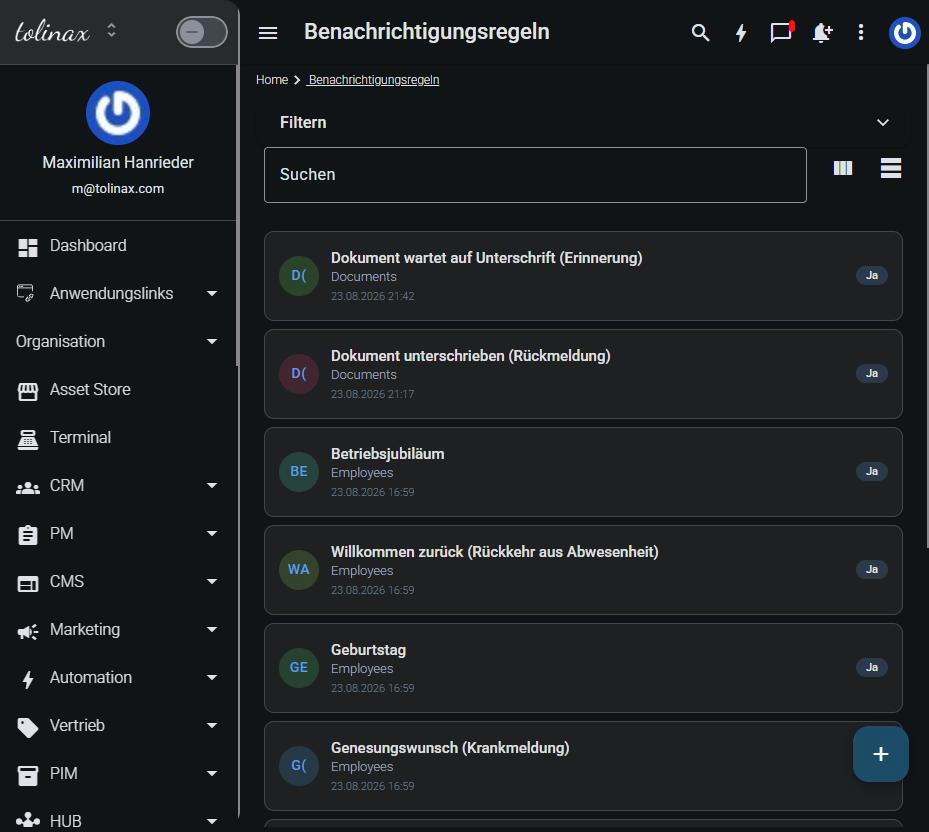
L'elenco delle regole di notifica

Ogni regola ti mostra tre cose:

  • il motivo, ad esempio Documento in attesa di firma (promemoria)
  • l'area da cui proviene l'evento, ad esempio Documenti o Personale
  • se è attiva

Modificare una regola

Fai clic sulla regola. Al suo interno stabilisci chi viene avvisato e su quale canale
esce il messaggio.

Un motivo può avere più destinatari, e lo stesso motivo può raggiungere persone diverse per vie
diverse. Il responsabile riceve un'e-mail, il team un messaggio nell'applicazione: è
un'impostazione del tutto normale, non un caso particolare.

Disattivare una regola

Non devi eliminare una regola per avere un po' di quiete. Impostala come inattiva: così resta e
puoi riattivarla in seguito senza ricrearla.

È la strada migliore quando vi serve mettere in pausa un motivo solo temporaneamente, ad esempio
gli avvisi di ferie durante una chiusura aziendale.

Che cosa imposta ciascuno per sé

Oltre alle regole valide per tutta l'azienda, ogni persona ha le proprie impostazioni di
notifica nel suo profilo. Lì decide di che cosa vuole essere informata personalmente.

È importante saperlo quando qualcuno ti dice che riceve troppi o troppo pochi messaggi:
controlla prima il profilo personale, prima di intervenire sulle regole aziendali. Una modifica
lì riguarda tutti.

Un buon punto di partenza

Iniziate con poche regole attive e aggiungete ciò che manca. La strada opposta —attivare tutto e
poi scremare— porta immancabilmente a messaggi che nessuno legge e a quelli importanti che ci si
perdono in mezzo.

Work with this page

Ready-made instructions for your AI tool. Copy, paste, go — the AI fetches the content itself via the address in the text.

Summarise the steps for me The essentials, in the right order.
Read the following documentation by tolinax UG and work with it.

This page: https://ayoune.com/en/docs/admin-handbook/notifiche.md
The complete collection: https://ayoune.com/en/docs/admin-handbook.md

Summarise the content for me.

- First, in two sentences: what is this about?
- Then the steps in the order I need to take them.
- One line per step, in plain language.
- At the end: what I should have ready beforehand.

Leave out nothing I need in order to actually finish.
A note on sources:
- Every page of this documentation is available as Markdown (the same address with `.md`).
- A machine-readable overview of all public content is at `/llms.txt`.
- If you have access to the aYOUne MCP server, you can work against live data
  instead of this snapshot. If not, ignore this point.
Explain what I need this for What it is good for — and when it is worth it.
Read the following documentation by tolinax UG and work with it.

This page: https://ayoune.com/en/docs/admin-handbook/notifiche.md
The complete collection: https://ayoune.com/en/docs/admin-handbook.md

Explain to me what I need this for.

1. Which problem does it solve? In one sentence, from my point of view.
2. Three typical situations in which it genuinely helps me.
3. When I do NOT need it — that saves me time.
4. What I can do instead if it is not a fit.

Stick to what the source says. Where it gives nothing, say so openly instead
of guessing.
A note on sources:
- Every page of this documentation is available as Markdown (the same address with `.md`).
- A machine-readable overview of all public content is at `/llms.txt`.
- If you have access to the aYOUne MCP server, you can work against live data
  instead of this snapshot. If not, ignore this point.
Help me set this up Step by step, asking me as you go.
Read the following documentation by tolinax UG and work with it.

This page: https://ayoune.com/en/docs/admin-handbook/notifiche.md
The complete collection: https://ayoune.com/en/docs/admin-handbook.md

Walk me through the setup step by step.

- First tell me what I need to have ready (access, data, time).
- Then take me through ONE step at a time. Wait for my "next".
- For each step, say how I can tell that it worked.
- If something goes wrong, ask me for the exact message instead of guessing.

If the instructions leave a point open, tell me so rather than inventing it.
A note on sources:
- Every page of this documentation is available as Markdown (the same address with `.md`).
- A machine-readable overview of all public content is at `/llms.txt`.
- If you have access to the aYOUne MCP server, you can work against live data
  instead of this snapshot. If not, ignore this point.
Help me with a problem Narrow down the cause instead of guessing.
Read the following documentation by tolinax UG and work with it.

This page: https://ayoune.com/en/docs/admin-handbook/notifiche.md
The complete collection: https://ayoune.com/en/docs/admin-handbook.md

Help me narrow down a problem.

- First ask me what I observe and what I expected instead.
- From that, derive the most likely causes consistent with this source.
- For each cause, give me ONE test that confirms or rules it out.
- Order them so the cheapest test comes first.

Do not guess. If the source does not cover the problem, tell me where I should
look next.
A note on sources:
- Every page of this documentation is available as Markdown (the same address with `.md`).
- A machine-readable overview of all public content is at `/llms.txt`.
- If you have access to the aYOUne MCP server, you can work against live data
  instead of this snapshot. If not, ignore this point.
Explain it in plain words No jargon, from the ground up.
Read the following documentation by tolinax UG and work with it.

This page: https://ayoune.com/en/docs/admin-handbook/notifiche.md
The complete collection: https://ayoune.com/en/docs/admin-handbook.md

Explain the content so that someone without prior knowledge understands it.

- Start with the purpose: why does this exist at all?
- Explain technical terms in half a sentence on first use.
- One everyday comparison where it genuinely holds — none where it limps.
- At the end: the three things worth remembering.

Do not shorten by dropping conditions. A simplification that hides a
prerequisite is a false statement.
A note on sources:
- Every page of this documentation is available as Markdown (the same address with `.md`).
- A machine-readable overview of all public content is at `/llms.txt`.
- If you have access to the aYOUne MCP server, you can work against live data
  instead of this snapshot. If not, ignore this point.
A checklist to tick off To follow along while you do it.
Read the following documentation by tolinax UG and work with it.

This page: https://ayoune.com/en/docs/admin-handbook/notifiche.md
The complete collection: https://ayoune.com/en/docs/admin-handbook.md

Turn this into a **tick-off checklist** for practical use.

- Exactly one action per item, in the imperative.
- Order it so that no item depends on a later prerequisite.
- Prerequisites and pitfalls as indented sub-items.
- End with an acceptance step: how do I know everything is right?
A note on sources:
- Every page of this documentation is available as Markdown (the same address with `.md`).
- A machine-readable overview of all public content is at `/llms.txt`.
- If you have access to the aYOUne MCP server, you can work against live data
  instead of this snapshot. If not, ignore this point.

Was this article helpful?

👎 No (0)
Leave a comment