Skip to content
aYOUne
Not in your language

This page is not yet available in en. You're reading the it version.

Marchio

Marchio

Al momento dell'accesso le tue persone devono vedere il vostro marchio, non uno estraneo. Tutto
ciò che serve è raccolto in un unico posto.

Dove si imposta

Amministrazione → Azienda → Marchio

La pagina Azienda ha tre schede: Generale, Legale e Marchio. La terza è quella di
cui tratta questo capitolo.
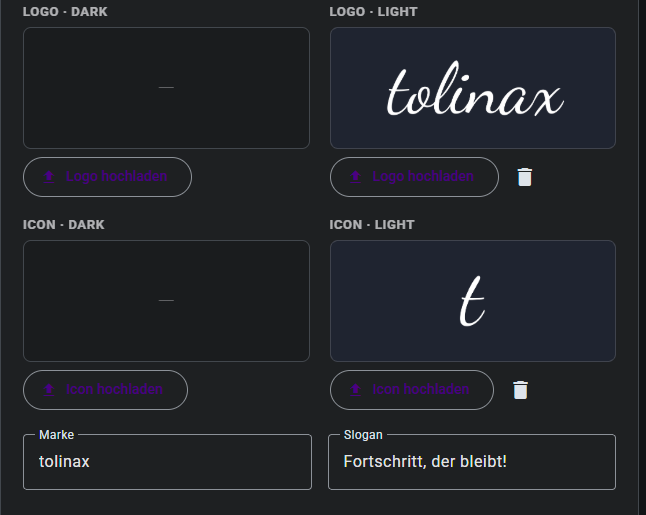
La scheda Marchio con i campi per logo, icona, marchio e slogan

Che cosa si inserisce

Logo e icona, due volte ciascuno

Si inseriscono quattro immagini, e il motivo è semplice: una parte delle tue persone lavora con
aspetto chiaro e una parte con aspetto scuro, e un logo che sta bene sul bianco scompare sul
nero.

CampoA che cosa serve
Logo chiaroIl logo completo su sfondo chiaro
Logo scuroLo stesso logo per l'aspetto scuro
Icona chiaraLa forma breve, per barre strette e per la scheda del browser
Icona scuraLa stessa forma breve per sfondo scuro

Ogni campo ha il suo Carica logo o Carica icona; un'immagine già inserita si rimuove con
il simbolo del cestino accanto.

Se hai una sola versione: inseriscila in entrambi i campi. È meglio che lasciarne uno vuoto:
vuoto significa che in quel punto non compare alcun logo.

Marchio e slogan

Sotto ci sono due campi di testo:

  • Marchio: il nome con cui vi presentate. Può differire dalla ragione sociale registrata, ed

è esattamente per questo che il campo esiste.

  • Slogan: la frase che sta sotto al nome.

Da dove iniziare

L'ordine che comporta meno lavoro successivo:

  1. Prima Logo chiaro e Icona chiara: è l'impostazione predefinita, quella che vedono i

più.

  1. Poi le versioni scure.
  2. Infine Marchio e Slogan.

Dopo aver salvato, vale la pena dare un'occhiata con aspetto chiaro e scuro. L'errore più
frequente è un logo scuro finito per sbaglio anche nel campo scuro, dove diventa invisibile.

Dati aziendali e dati legali

Le altre due schede fanno parte dello stesso compito, anche se non hanno a che fare con
l'aspetto:

Generale contiene ragione sociale, e-mail, telefono, sito web e indirizzo. Un campo merita
attenzione: il settore. Determina quali moduli vi vengono proposti nella pagina iniziale,
quindi un settore impostato male porta a raccomandazioni che non calzano.
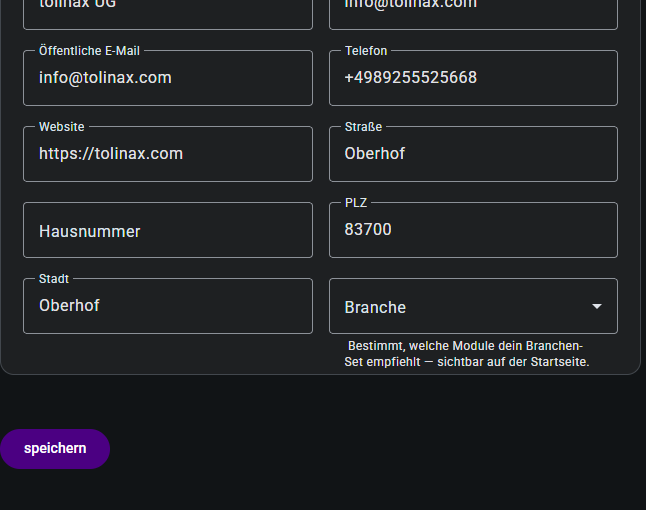
La scheda Generale dei dati aziendali

Legale raccoglie i dati che compaiono nei vostri documenti e nei vostri invii.

Work with this page

Ready-made instructions for your AI tool. Copy, paste, go — the AI fetches the content itself via the address in the text.

Summarise the steps for me The essentials, in the right order.
Read the following documentation by tolinax UG and work with it.

This page: https://ayoune.com/en/docs/admin-handbook/marchio.md
The complete collection: https://ayoune.com/en/docs/admin-handbook.md

Summarise the content for me.

- First, in two sentences: what is this about?
- Then the steps in the order I need to take them.
- One line per step, in plain language.
- At the end: what I should have ready beforehand.

Leave out nothing I need in order to actually finish.
A note on sources:
- Every page of this documentation is available as Markdown (the same address with `.md`).
- A machine-readable overview of all public content is at `/llms.txt`.
- If you have access to the aYOUne MCP server, you can work against live data
  instead of this snapshot. If not, ignore this point.
Explain what I need this for What it is good for — and when it is worth it.
Read the following documentation by tolinax UG and work with it.

This page: https://ayoune.com/en/docs/admin-handbook/marchio.md
The complete collection: https://ayoune.com/en/docs/admin-handbook.md

Explain to me what I need this for.

1. Which problem does it solve? In one sentence, from my point of view.
2. Three typical situations in which it genuinely helps me.
3. When I do NOT need it — that saves me time.
4. What I can do instead if it is not a fit.

Stick to what the source says. Where it gives nothing, say so openly instead
of guessing.
A note on sources:
- Every page of this documentation is available as Markdown (the same address with `.md`).
- A machine-readable overview of all public content is at `/llms.txt`.
- If you have access to the aYOUne MCP server, you can work against live data
  instead of this snapshot. If not, ignore this point.
Help me set this up Step by step, asking me as you go.
Read the following documentation by tolinax UG and work with it.

This page: https://ayoune.com/en/docs/admin-handbook/marchio.md
The complete collection: https://ayoune.com/en/docs/admin-handbook.md

Walk me through the setup step by step.

- First tell me what I need to have ready (access, data, time).
- Then take me through ONE step at a time. Wait for my "next".
- For each step, say how I can tell that it worked.
- If something goes wrong, ask me for the exact message instead of guessing.

If the instructions leave a point open, tell me so rather than inventing it.
A note on sources:
- Every page of this documentation is available as Markdown (the same address with `.md`).
- A machine-readable overview of all public content is at `/llms.txt`.
- If you have access to the aYOUne MCP server, you can work against live data
  instead of this snapshot. If not, ignore this point.
Help me with a problem Narrow down the cause instead of guessing.
Read the following documentation by tolinax UG and work with it.

This page: https://ayoune.com/en/docs/admin-handbook/marchio.md
The complete collection: https://ayoune.com/en/docs/admin-handbook.md

Help me narrow down a problem.

- First ask me what I observe and what I expected instead.
- From that, derive the most likely causes consistent with this source.
- For each cause, give me ONE test that confirms or rules it out.
- Order them so the cheapest test comes first.

Do not guess. If the source does not cover the problem, tell me where I should
look next.
A note on sources:
- Every page of this documentation is available as Markdown (the same address with `.md`).
- A machine-readable overview of all public content is at `/llms.txt`.
- If you have access to the aYOUne MCP server, you can work against live data
  instead of this snapshot. If not, ignore this point.
Explain it in plain words No jargon, from the ground up.
Read the following documentation by tolinax UG and work with it.

This page: https://ayoune.com/en/docs/admin-handbook/marchio.md
The complete collection: https://ayoune.com/en/docs/admin-handbook.md

Explain the content so that someone without prior knowledge understands it.

- Start with the purpose: why does this exist at all?
- Explain technical terms in half a sentence on first use.
- One everyday comparison where it genuinely holds — none where it limps.
- At the end: the three things worth remembering.

Do not shorten by dropping conditions. A simplification that hides a
prerequisite is a false statement.
A note on sources:
- Every page of this documentation is available as Markdown (the same address with `.md`).
- A machine-readable overview of all public content is at `/llms.txt`.
- If you have access to the aYOUne MCP server, you can work against live data
  instead of this snapshot. If not, ignore this point.
A checklist to tick off To follow along while you do it.
Read the following documentation by tolinax UG and work with it.

This page: https://ayoune.com/en/docs/admin-handbook/marchio.md
The complete collection: https://ayoune.com/en/docs/admin-handbook.md

Turn this into a **tick-off checklist** for practical use.

- Exactly one action per item, in the imperative.
- Order it so that no item depends on a later prerequisite.
- Prerequisites and pitfalls as indented sub-items.
- End with an acceptance step: how do I know everything is right?
A note on sources:
- Every page of this documentation is available as Markdown (the same address with `.md`).
- A machine-readable overview of all public content is at `/llms.txt`.
- If you have access to the aYOUne MCP server, you can work against live data
  instead of this snapshot. If not, ignore this point.

Was this article helpful?

👎 No (0)
Leave a comment