Skip to content
aYOUne
Not in your language

This page is not yet available in en. You're reading the de version.

Benachrichtigungen

Benachrichtigungen

aYOUne meldet sich, wenn etwas passiert, das jemanden angeht: Ein Dokument wartet auf eine
Unterschrift, ein Mitarbeiter hat Geburtstag, jemand kommt aus dem Urlaub zurück. Welche dieser
Anlässe bei euch tatsächlich eine Nachricht auslösen, entscheidest du.

Wo du das einstellst

Öffne Benachrichtigungsregeln. Du siehst eine Liste von Anlässen — jeder Eintrag ist eine
Regel, die auf ein bestimmtes Ereignis wartet.
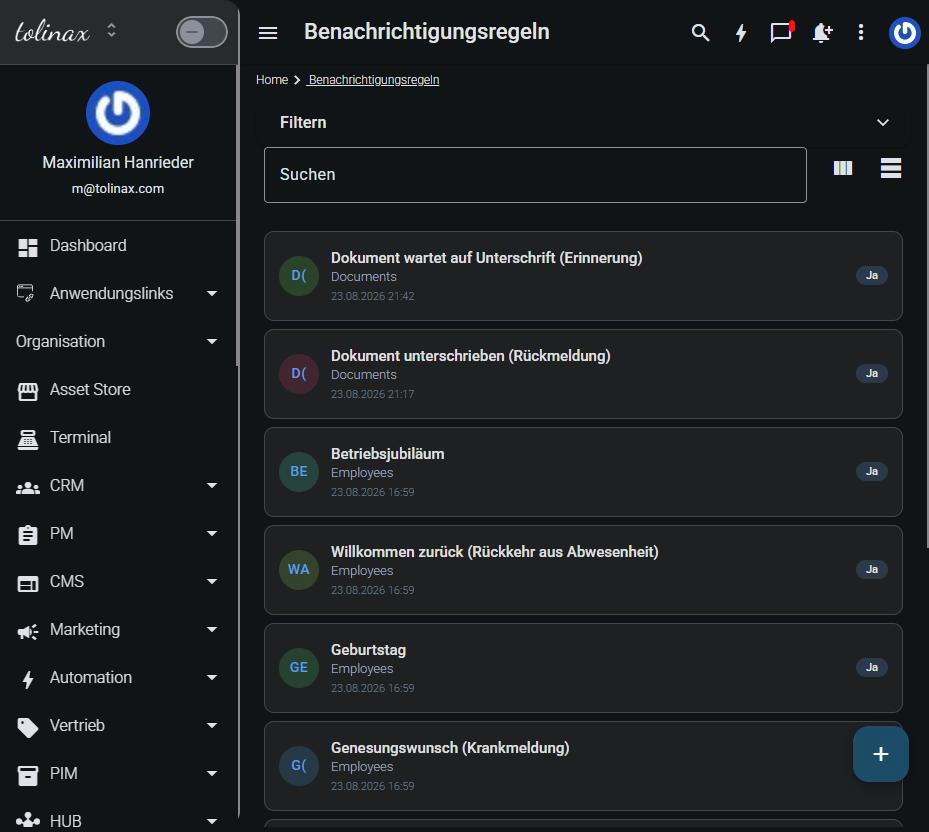
Die Liste der Benachrichtigungsregeln

Jede Regel zeigt dir drei Dinge:

  • den Anlass, etwa Dokument wartet auf Unterschrift (Erinnerung)
  • den Bereich, aus dem das Ereignis kommt, etwa Dokumente oder Personal
  • ob sie aktiv ist

Eine Regel anpassen

Klicke die Regel an. Du legst darin fest, wer benachrichtigt wird und worüber — also
über welchen Kanal die Nachricht hinausgeht.

Ein Anlass kann mehrere Empfänger haben, und derselbe Anlass kann verschiedene Menschen über
verschiedene Wege erreichen. Die Führungskraft bekommt eine E-Mail, das Team eine Nachricht in
der Anwendung — das ist eine ganz normale Einstellung, kein Sonderfall.

Eine Regel abschalten

Du musst eine Regel nicht löschen, um Ruhe zu haben. Setze sie auf inaktiv, dann bleibt sie
erhalten und du kannst sie später ohne Neuanlage wieder einschalten.

Das ist der bessere Weg, wenn ihr einen Anlass nur vorübergehend nicht braucht — etwa
Urlaubsmeldungen während einer Betriebsruhe.

Was jede Person für sich selbst einstellt

Neben den unternehmensweiten Regeln hat jede Person eigene Benachrichtigungseinstellungen in
ihrem Profil. Dort entscheidet sie, worüber sie persönlich informiert werden möchte.

Das ist wichtig zu wissen, wenn sich jemand meldet, er bekomme zu viele oder zu wenige
Nachrichten: Prüfe zuerst das persönliche Profil, bevor du an den unternehmensweiten Regeln
drehst. Eine Änderung dort trifft alle.

Ein guter Ausgangspunkt

Fangt mit wenigen aktiven Regeln an und schaltet nach, was vermisst wird. Der umgekehrte Weg —
alles einschalten und dann aussortieren — führt erfahrungsgemäß dazu, dass die Nachrichten
ungelesen bleiben und die wichtigen darin untergehen.

Work with this page

Ready-made instructions for your AI tool. Copy, paste, go — the AI fetches the content itself via the address in the text.

Summarise the steps for me The essentials, in the right order.
Read the following documentation by tolinax UG and work with it.

This page: https://ayoune.com/en/docs/admin-handbook/benachrichtigungen.md
The complete collection: https://ayoune.com/en/docs/admin-handbook.md

Summarise the content for me.

- First, in two sentences: what is this about?
- Then the steps in the order I need to take them.
- One line per step, in plain language.
- At the end: what I should have ready beforehand.

Leave out nothing I need in order to actually finish.
A note on sources:
- Every page of this documentation is available as Markdown (the same address with `.md`).
- A machine-readable overview of all public content is at `/llms.txt`.
- If you have access to the aYOUne MCP server, you can work against live data
  instead of this snapshot. If not, ignore this point.
Explain what I need this for What it is good for — and when it is worth it.
Read the following documentation by tolinax UG and work with it.

This page: https://ayoune.com/en/docs/admin-handbook/benachrichtigungen.md
The complete collection: https://ayoune.com/en/docs/admin-handbook.md

Explain to me what I need this for.

1. Which problem does it solve? In one sentence, from my point of view.
2. Three typical situations in which it genuinely helps me.
3. When I do NOT need it — that saves me time.
4. What I can do instead if it is not a fit.

Stick to what the source says. Where it gives nothing, say so openly instead
of guessing.
A note on sources:
- Every page of this documentation is available as Markdown (the same address with `.md`).
- A machine-readable overview of all public content is at `/llms.txt`.
- If you have access to the aYOUne MCP server, you can work against live data
  instead of this snapshot. If not, ignore this point.
Help me set this up Step by step, asking me as you go.
Read the following documentation by tolinax UG and work with it.

This page: https://ayoune.com/en/docs/admin-handbook/benachrichtigungen.md
The complete collection: https://ayoune.com/en/docs/admin-handbook.md

Walk me through the setup step by step.

- First tell me what I need to have ready (access, data, time).
- Then take me through ONE step at a time. Wait for my "next".
- For each step, say how I can tell that it worked.
- If something goes wrong, ask me for the exact message instead of guessing.

If the instructions leave a point open, tell me so rather than inventing it.
A note on sources:
- Every page of this documentation is available as Markdown (the same address with `.md`).
- A machine-readable overview of all public content is at `/llms.txt`.
- If you have access to the aYOUne MCP server, you can work against live data
  instead of this snapshot. If not, ignore this point.
Help me with a problem Narrow down the cause instead of guessing.
Read the following documentation by tolinax UG and work with it.

This page: https://ayoune.com/en/docs/admin-handbook/benachrichtigungen.md
The complete collection: https://ayoune.com/en/docs/admin-handbook.md

Help me narrow down a problem.

- First ask me what I observe and what I expected instead.
- From that, derive the most likely causes consistent with this source.
- For each cause, give me ONE test that confirms or rules it out.
- Order them so the cheapest test comes first.

Do not guess. If the source does not cover the problem, tell me where I should
look next.
A note on sources:
- Every page of this documentation is available as Markdown (the same address with `.md`).
- A machine-readable overview of all public content is at `/llms.txt`.
- If you have access to the aYOUne MCP server, you can work against live data
  instead of this snapshot. If not, ignore this point.
Explain it in plain words No jargon, from the ground up.
Read the following documentation by tolinax UG and work with it.

This page: https://ayoune.com/en/docs/admin-handbook/benachrichtigungen.md
The complete collection: https://ayoune.com/en/docs/admin-handbook.md

Explain the content so that someone without prior knowledge understands it.

- Start with the purpose: why does this exist at all?
- Explain technical terms in half a sentence on first use.
- One everyday comparison where it genuinely holds — none where it limps.
- At the end: the three things worth remembering.

Do not shorten by dropping conditions. A simplification that hides a
prerequisite is a false statement.
A note on sources:
- Every page of this documentation is available as Markdown (the same address with `.md`).
- A machine-readable overview of all public content is at `/llms.txt`.
- If you have access to the aYOUne MCP server, you can work against live data
  instead of this snapshot. If not, ignore this point.
A checklist to tick off To follow along while you do it.
Read the following documentation by tolinax UG and work with it.

This page: https://ayoune.com/en/docs/admin-handbook/benachrichtigungen.md
The complete collection: https://ayoune.com/en/docs/admin-handbook.md

Turn this into a **tick-off checklist** for practical use.

- Exactly one action per item, in the imperative.
- Order it so that no item depends on a later prerequisite.
- Prerequisites and pitfalls as indented sub-items.
- End with an acceptance step: how do I know everything is right?
A note on sources:
- Every page of this documentation is available as Markdown (the same address with `.md`).
- A machine-readable overview of all public content is at `/llms.txt`.
- If you have access to the aYOUne MCP server, you can work against live data
  instead of this snapshot. If not, ignore this point.

Was this article helpful?

👎 No (0)
Leave a comment